How the Shein Free Trial Center Works for Shoppers
An overview of the Shein Free Trial Center: product groups, weekly applications, tracking results, submitting reports and using Rewrite.
Advertisement
The Free Trial Center lets shoppers ask for items tied to specific campaigns, although choosing a product and submitting the request is merely the opening move in a process that unfolds over several weeks.
Product Groups Available









It is the program supplier, not the shopper, who decides which items are listed and at what moment.
Joining in carries no promise of being selected.
The whole process takes place on Shein's own platform, which reviews each request and decides who is selected. Participants who are chosen then have to try out the item and publish their assessment within the allotted period.
This page only explains how the program works. Alderiva is not affiliated with Shein and does not collect personal information, receive applications or take part in the selection. Knowing each phase in advance helps participants avoid missed deadlines and similar problems.
Finding the trial area
According to the program rules, participants first sign in and navigate to the Free Trial Center, which in the app sits under Profile → More Services → Other Services → Free Trial Center. That page displays the products whose campaigns are presently open.
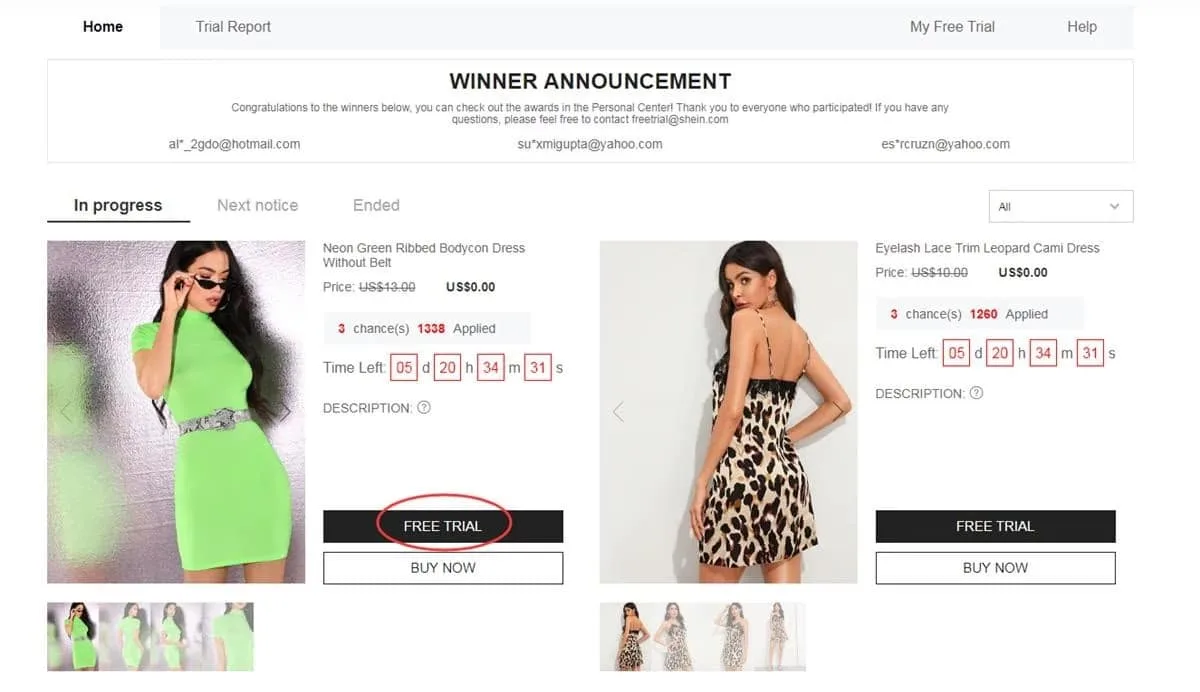
A dedicated page gathers every campaign that is open to newcomers right now
Selecting products for testing
The program caps each shopper at 3 applications a week, and any slots that go unused within that cycle simply vanish. Prior to choosing, participants are advised to verify the size and make sure the address on file falls inside the region covered by the store.
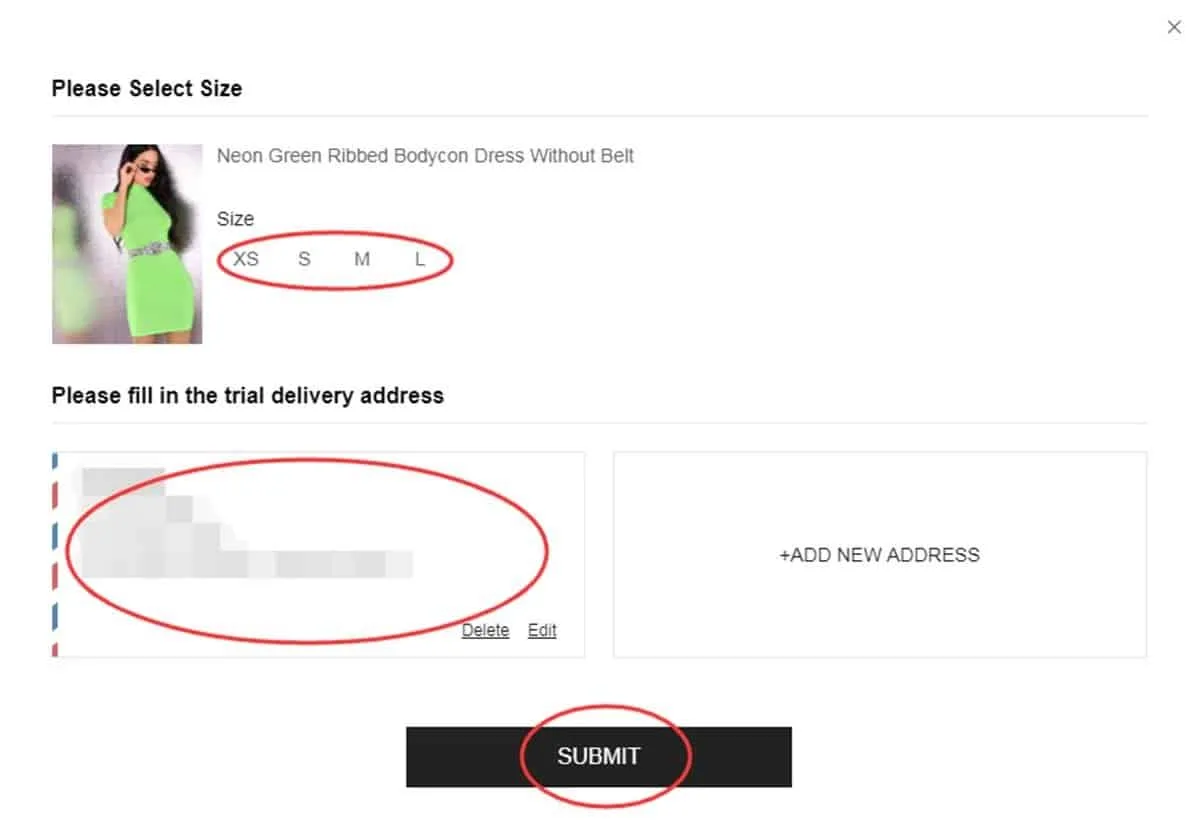
Confirm product and shipping information prior to submitting
Tracking where a request stands
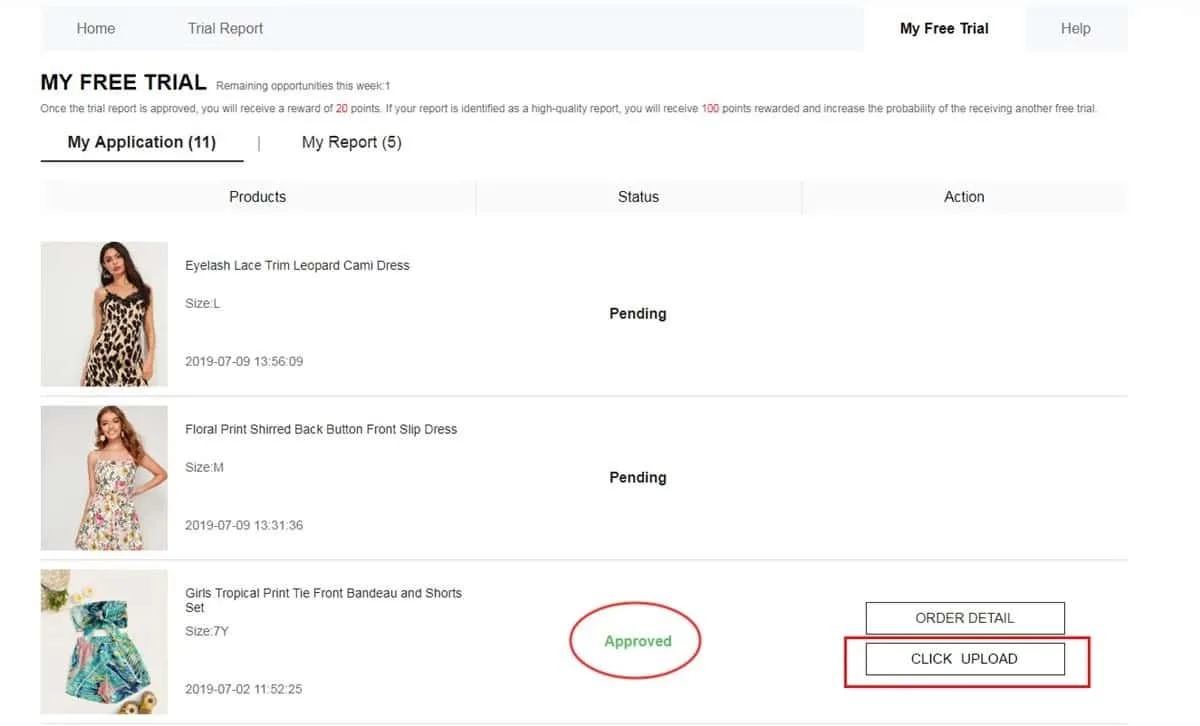
After submission, shoppers can monitor each request through “My Free Trial” or “My Applications”, where an answer usually appears within roughly a week. A label reading “Approved” signals selection for that trial, whereas “Failed” means the request was passed over on this occasion.
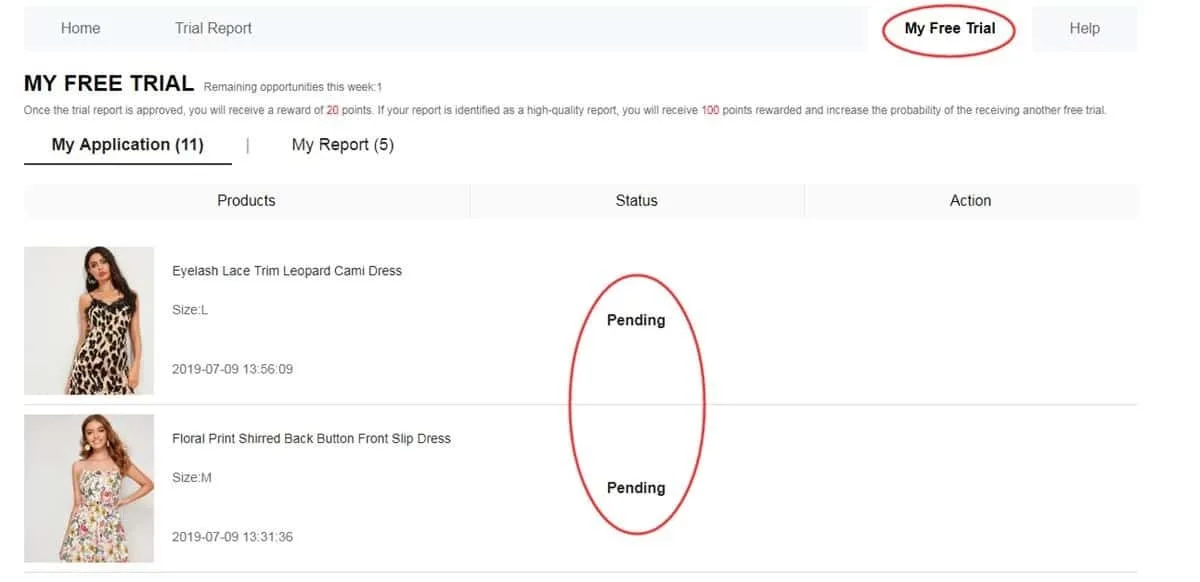
A record reveals which requests moved forward in the process
Putting the delivered item to use
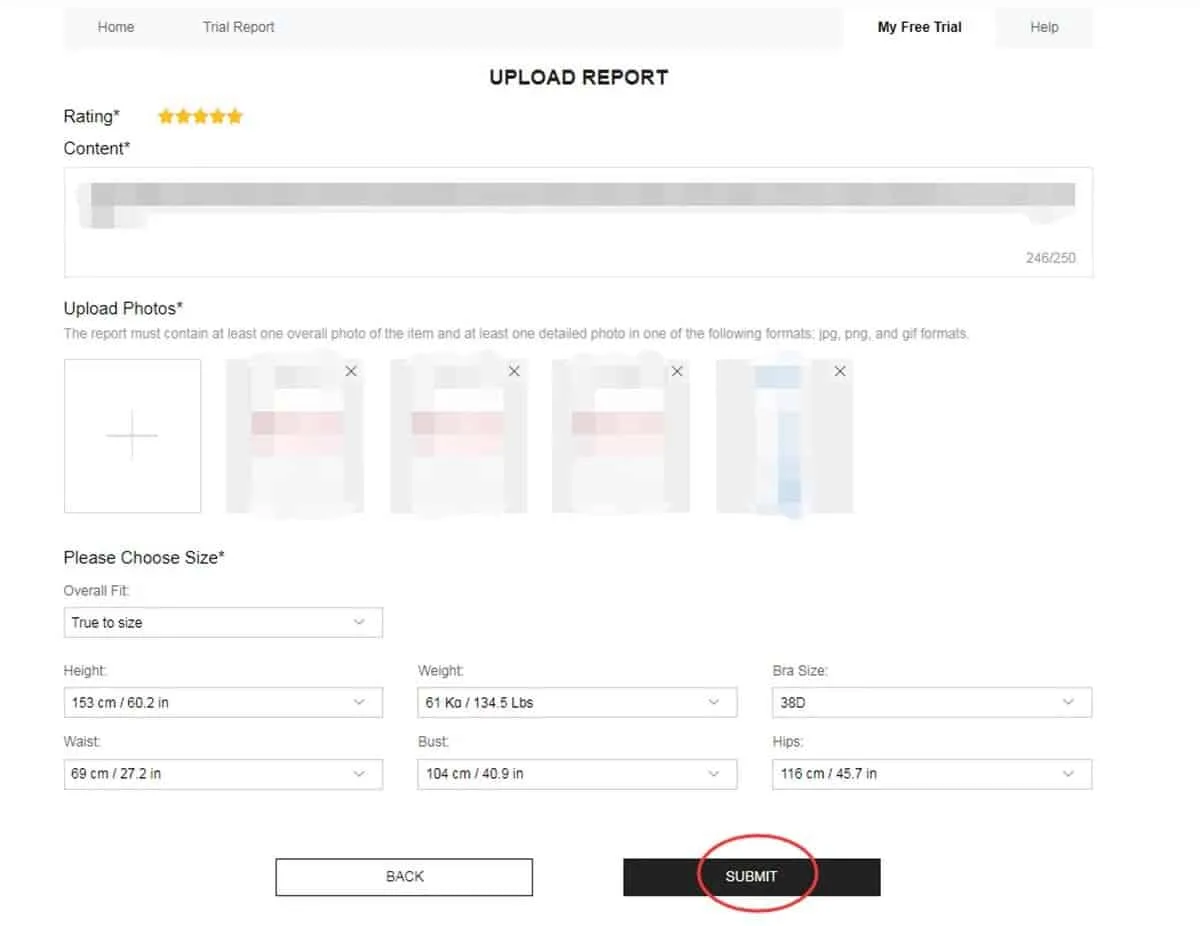
With the approved product in hand, participants are expected to use it for real before drafting the report, observing its material, finish, comfort, fit, appearance and overall quality. The program asks for an assessment based on actual use, with photos the participant took, submitted no later than 10 days after delivery.
Publish a detailed assessment illustrated with photos you took yourself
Checking whether the report passed
Having completed the assessment, participants may visit My Report to learn how it was judged. According to the program rules, an accepted report usually credits 20 points, while one that also earns the “High-Quality Report” label can bring an extra 100. Such rewards, however, do not guarantee selection in future campaigns.
Here the verdict on the assessment appears alongside the points it earned
Getting a second shot at a rejected report
Not every assessment clears moderation at first. If a report carries the Failed status, participants ought to check whether the Rewrite button is available, in which case they may revise the wording, include more relevant observations and replace images that are too dark, out of focus or unclear.
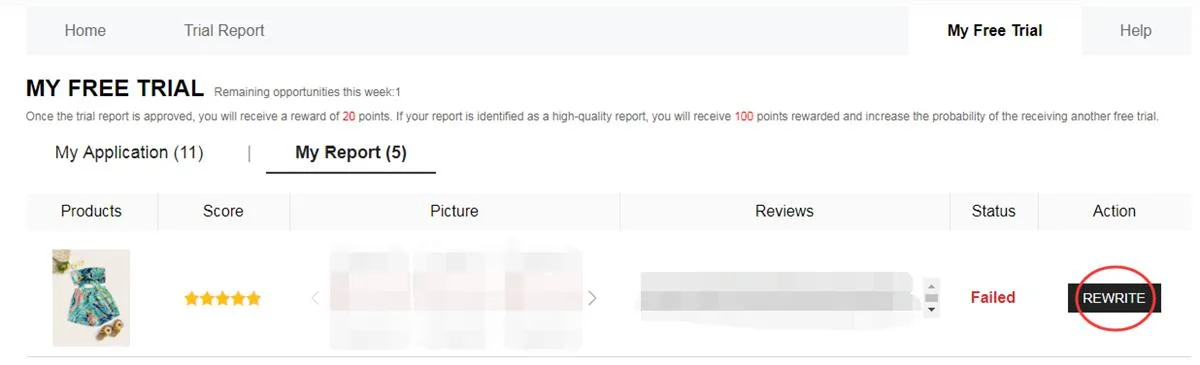
Rewrite, whenever it is offered, lets participants revise and resubmit the content
How does the process run from request to report?
Everything starts with exploring the campaigns that are open and choosing the products that appeal. Since the catalog keeps changing, an item visible in one week may well have disappeared by the next round.
The request then goes under evaluation, a phase in which shipment is not yet assured, because each application hinges on the verdict that later shows up on the dashboard.
If the request is approved, the item travels to the address registered in the account, and after it arrives the testing phase begins, in which participants are meant to examine the product's various qualities in depth.
The process closes with the report. Besides meeting the deadline, participants are expected to deliver original, informative text supported by images that accurately depict the item received.
Which segments may show up in a given campaign?
The assortment varies according to stock in each period, though the catalog may span several segments:
- Apparel: dresses, T-shirts, blouses, denim, sportswear, outerwear and further garments.
- Cosmetics and care: makeup, skin treatments and items for daily self-care routines.
- Add-ons: bags, shoes, fashion add-ons, jewelry and assorted style pieces.
- Home and storage: cookware, ornamental objects, storage solutions and goods for each room of the house.
Having been turned down before does not mean future requests will meet the same fate.
Every fresh round likewise offers shoppers an opportunity to review their information and reapply with correct details.
What turns a review into a helpful one?
An effective report goes well beyond saying whether the shopper enjoyed the product, since participants are expected to record concrete observations from real use:
• Mention the advantages while also noting aspects that could improve.
• Comment on fit, fabric, finish, comfort and the item's true appearance.
• Include self-taken pictures, well lit and framed so the product is plainly visible.
• Offer observations that could help a prospective buyer of that item.
Mistakes that may hurt a participant's chances
A quick verification before every stage goes a long way toward avoiding frequent problems:
❌ Keeping essential profile information unfinished or outdated.
❌ Using a shipping address that lies beyond the selected store's region.
❌ Confirming a product without carefully verifying its size and other specifications.
❌ Submitting a superficial report that says nothing about the item's performance.
❌ Attaching low-quality pictures or shots where the item can barely be seen.
❌ Letting the window of up to 10 days for the assessment run out.
❌ Ignoring the opportunity to revise the report after Rewrite has been unlocked.
❌ Supplying information that does not match what participation actually requires.
Ground rules participants should know
• Participants may file no more than 3 applications in any week, and slots they leave unused never roll over into a later cycle.
• The address on record must belong to the same country or region as the store through which the request was made.
• Standard shipping is covered by the program, although customs regulations and possible charges vary by destination.
• After delivery, participants are given a limited period in which to complete and submit the mandatory report.
• A rejected assessment may receive the Rewrite option, which permits changes before a fresh evaluation takes place.
• Submitting false information or abusing accounts may result in limits or exclusion from later campaigns.
• Carrying out each stage correctly and completing the reports are duties that every trial participant takes on.
Common questions from shoppers
Does applying cost anything?
No payment is involved in asking for an item via the Free Trial Center, although submitting a request never guarantees that it will be chosen.
How many requests fit into a single week?
According to the program rules, each weekly cycle permits up to 3 products, and unused slots do not transfer to the following week.
Does being turned down prevent later participation?
Not at all, since an unsuccessful request applies only to that specific campaign, and shoppers remain free to watch for fresh offers and apply again as new products are listed.
How does a participant know a review requires changes?
My Report holds the answer: if an assessment is shown as Failed and Rewrite is available, its content may be edited and resubmitted.
Want a more detailed view of every stage?
See how to navigate the Free Trial Center, keep tabs on requests and prepare a solid assessment if chosen.


